How to Check, View And Download Your UAE Labour Contract Online For Free Through MoHRE’s Official Services
A step-by-step guide for employees to access their verified job contract digitally for legal protection, reference and future use.
 Staff WriterJan 8, 2026, 12:19 PM
Need to confirm when your employment contract expires or check your leave entitlements? You can easily access your UAE labour contract on your phone or computer to review key employment details whenever you need them.
Every employee in the UAE is legally entitled to receive a copy of their labour contract issued and attested by the Ministry of Human Resources and Emiratisation (MoHRE). However, the physical document may not always be readily available.
The good news is that MoHRE allows employees to view and download their labour contracts online for free through its official website and mobile app. Saving a digital copy on your phone or laptop ensures quick and convenient access at all times.
Why keeping a copy of your job contract matters
Holding a verified digital copy of your labour contract can be useful for several reasons:
- Proof of employment terms: It records the agreed salary, benefits, working hours, job role and other conditions of employment.
- Legal protection: In the event of a dispute with your employer, the contract serves as official legal evidence.
- Clarity on rights and duties: It clearly sets out the rights and obligations of both parties, reducing the risk of misunderstandings.
- Future reference: The contract is helpful when reviewing employment details or negotiating new terms later on.
- Financial documentation: Banks or landlords may request it when applying for loans, opening accounts or, in some cases, renting a property.
Employees’ legal right to a contract copy
UAE law expressly guarantees workers the right to retain a copy of their employment contract. Article 8(1) of Federal Decree-Law No. 33 of 2021 states that employment contracts must be issued in two copies—one for the employer and one for the employee—in accordance with MoHRE’s prescribed format.
How to check your MoHRE labour contract online
You can access your contract in two ways:
- Through the MoHRE website
- Through the MoHRE mobile application (available on Apple and Android devices)
Via the MoHRE website
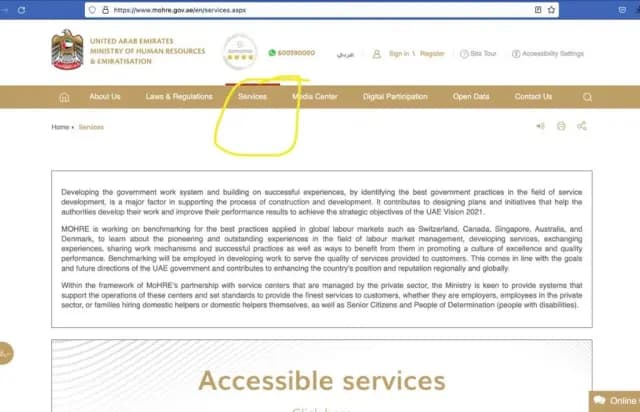
- Visit mohre.gov.ae, click on Services, and select View Approved Contract.
- Choose Search by EIDA No, enter your Emirates ID number, and request a one-time password (OTP). The OTP will be sent to the mobile number linked to your Emirates ID.
- Enter the OTP and click View My Contract.
You can then view and save your labour contract to your device.
Via the MoHRE app
- Open the app and log in using UAE Pass. If you are a new user, sign up by providing your contact details and labour card number.
- After logging in, go to My Dashboard and scroll down to Contract.
You will be able to view your contract and download a copy directly to your phone.
What details are included in your work contract?
Your UAE labour contract typically contains the following information:
- Name and address of the employer
- Name, nationality and date of birth of the employee
- Proof of identity, qualifications and job title
- Date of commencement and place of work
- Working hours and rest days
- Probation period, if applicable
- Contract duration
- Agreed wage, including benefits and allowances
- Annual leave entitlement
- Notice period
- Procedures
For any enquiries or information, contact ask@tlr.ae or call us on +971 52 644 3004. Follow The Law Reporters on WhatsApp Channels.